
中间件
中间件是在路由处理程序之前调用的函数。中间件函数可以访问请求和响应对象,以及应用请求-响应周期中的 next() 中间件函数。next 中间件函数通常用名为 next 的变量表示。
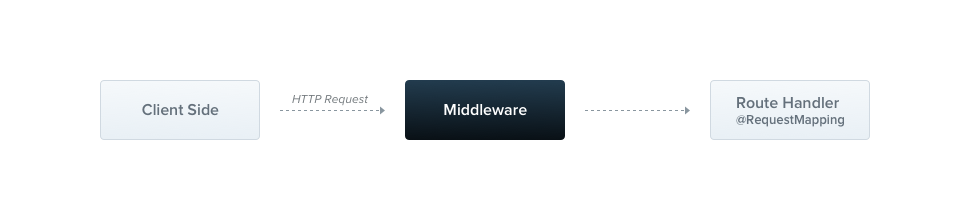
Nest 中间件默认等同于 express 中间件。以下是 express 官方文档对中间件功能的描述:
中间件函数可以执行以下任务:
- 执行任何代码。
- 对请求和响应对象进行修改。
- 结束请求-响应周期。
- 调用堆栈中的下一个中间件函数。
- 如果当前中间件函数没有结束请求-响应周期,它必须调用
next()将控制权传递给下一个中间件函数。否则,请求将被挂起。
你可以在函数中或在带有 @Injectable() 装饰器的类中实现自定义 Nest 中间件。类应该实现 NestMiddleware 接口,而函数没有任何特殊要求。让我们从使用类方法实现一个简单的中间件功能开始。
警告
Express 和 fastify 处理中间件的方式不同,提供不同的方法签名,在这里阅读更多。
import { Injectable, NestMiddleware } from '@nestjs/common';
import { Request, Response, NextFunction } from 'express';

@Injectable()
export class LoggerMiddleware implements NestMiddleware {
  use(req: Request, res: Response, next: NextFunction) {
    console.log('Request...');
    next();
  }
}
依赖注入
Nest 中间件完全支持依赖注入。就像提供者和控制器一样,它们能够注入同一模块内可用的依赖。和往常一样,这是通过 constructor 完成的。
应用中间件
@Module() 装饰器中没有中间件的位置。相反,我们使用模块类的 configure() 方法来设置它们。包含中间件的模块必须实现 NestModule 接口。让我们在 AppModule 级别设置 LoggerMiddleware。
import { Module, NestModule, MiddlewareConsumer } from '@nestjs/common';
import { LoggerMiddleware } from './common/middleware/logger.middleware';
import { CatsModule } from './cats/cats.module';

@Module({
  imports: [CatsModule],
})
export class AppModule implements NestModule {
  configure(consumer: MiddlewareConsumer) {
    consumer
      .apply(LoggerMiddleware)
      .forRoutes('cats');
  }
}
在上面的示例中,我们为之前在 CatsController 中定义的 /cats 路由处理程序设置了 LoggerMiddleware。我们还可以通过在配置中间件时向 forRoutes() 方法传递包含路由 path 和请求 method 的对象,将中间件进一步限制到特定的请求方法。在下面的示例中,注意我们导入了 RequestMethod 枚举来引用所需的请求方法类型。
import { Module, NestModule, RequestMethod, MiddlewareConsumer } from '@nestjs/common';
import { LoggerMiddleware } from './common/middleware/logger.middleware';
import { CatsModule } from './cats/cats.module';

@Module({
  imports: [CatsModule],
})
export class AppModule implements NestModule {
  configure(consumer: MiddlewareConsumer) {
    consumer
      .apply(LoggerMiddleware)
      .forRoutes({ path: 'cats', method: RequestMethod.GET });
  }
}
提示
configure() 方法可以使用 async/await 变为异步(例如,你可以在 configure() 方法体内 await 异步操作的完成)。
警告
使用 express 适配器时,NestJS 应用默认会注册 body-parser 包中的 json 和 urlencoded。这意味着如果你想通过 MiddlewareConsumer 自定义该中间件,你需要在使用 NestFactory.create() 创建应用时将 bodyParser 标志设置为 false 来关闭全局中间件。
路由通配符
NestJS 中间件也支持基于模式的路由。例如,命名通配符(*splat)可以用作通配符来匹配路由中的任意字符组合。在下面的示例中,中间件将对以 abcd/ 开头的任何路由执行,无论后面跟着多少个字符。
forRoutes({
  path: 'abcd/*splat',
  method: RequestMethod.ALL,
});
提示
splat 只是通配符参数的名称,没有特殊含义。你可以随意命名,例如 *wildcard。
'abcd/*' 路由路径将匹配 abcd/1、abcd/123、abcd/abc 等。连字符(-)和点(.)在基于字符串的路径中按字面意义解释。但是,没有额外字符的 abcd/ 不会匹配该路由。为此,你需要用大括号包裹通配符使其可选:
forRoutes({
  path: 'abcd/{*splat}',
  method: RequestMethod.ALL,
});
中间件消费者
MiddlewareConsumer 是一个辅助类。它提供了几个内置方法来管理中间件。所有方法都可以简单地以流式风格链式调用。forRoutes() 方法可以接受单个字符串、多个字符串、RouteInfo 对象、控制器类甚至多个控制器类。在大多数情况下,你可能只需传递以逗号分隔的控制器列表。以下是使用单个控制器的示例:
import { Module, NestModule, MiddlewareConsumer } from '@nestjs/common';
import { LoggerMiddleware } from './common/middleware/logger.middleware';
import { CatsModule } from './cats/cats.module';
import { CatsController } from './cats/cats.controller';

@Module({
  imports: [CatsModule],
})
export class AppModule implements NestModule {
  configure(consumer: MiddlewareConsumer) {
    consumer
      .apply(LoggerMiddleware)
      .forRoutes(CatsController);
  }
}
提示
apply() 方法可以接受单个中间件,或多个参数来指定多个中间件。
排除路由
有时,我们可能想排除某些路由不应用中间件。这可以使用 exclude() 方法轻松实现。exclude() 方法接受单个字符串、多个字符串或 RouteInfo 对象来标识要排除的路由。
以下是使用示例:
consumer
  .apply(LoggerMiddleware)
  .exclude(
    { path: 'cats', method: RequestMethod.GET },
    { path: 'cats', method: RequestMethod.POST },
    'cats/{*splat}',
  )
  .forRoutes(CatsController);
提示
exclude() 方法使用 path-to-regexp 包支持通配符参数。
在上面的示例中,LoggerMiddleware 将绑定到 CatsController 中定义的所有路由,除了传递给 exclude() 方法的三个路由。
函数式中间件
我们一直使用的 LoggerMiddleware 类非常简单。它没有成员、没有额外方法、没有依赖。为什么我们不能用简单的函数来定义它,而不是用类?实际上,我们可以。这种类型的中间件称为函数式中间件。让我们将日志中间件从基于类的转换为函数式中间件来说明区别:
import { Request, Response, NextFunction } from 'express';

export function logger(req: Request, res: Response, next: NextFunction) {
  console.log(`Request...`);
  next();
};
然后在 AppModule 中使用它:
consumer
  .apply(logger)
  .forRoutes(CatsController);
提示
当你的中间件不需要任何依赖时,考虑使用更简单的函数式中间件替代方案。
多个中间件
如上所述,要绑定按顺序执行的多个中间件,只需在 apply() 方法中提供以逗号分隔的列表:
consumer.apply(cors(), helmet(), logger).forRoutes(CatsController);全局中间件
如果我们想一次性将中间件绑定到每个注册的路由,我们可以使用 INestApplication 实例提供的 use() 方法:
const app = await NestFactory.create(AppModule);
app.use(logger);
await app.listen(process.env.PORT ?? 3000);
提示
在全局中间件中无法访问 DI 容器。使用 app.use() 时,你可以改用函数式中间件。或者,你可以使用类中间件,并在 AppModule(或任何其他模块)中通过 .forRoutes('*') 来使用它。